We Have Moved
Computer 101 is now located at 718 W 46th Ave, Vancouver, BC V5Z 2R3. Call (604) 901-9799 before visiting.

PS5 Turns On but Shows a Black Screen? What the White Light Means
Does your PS5 turn on, change from blue to steady white, but show a black screen or “No Signal”? Learn what this light pattern means, what you can check first, and when your console may need professional HDMI repair in Vancouver.
PS5, XBOX AND GAMING CONSOLE REPAIR
Ramin
7/20/20264 min read
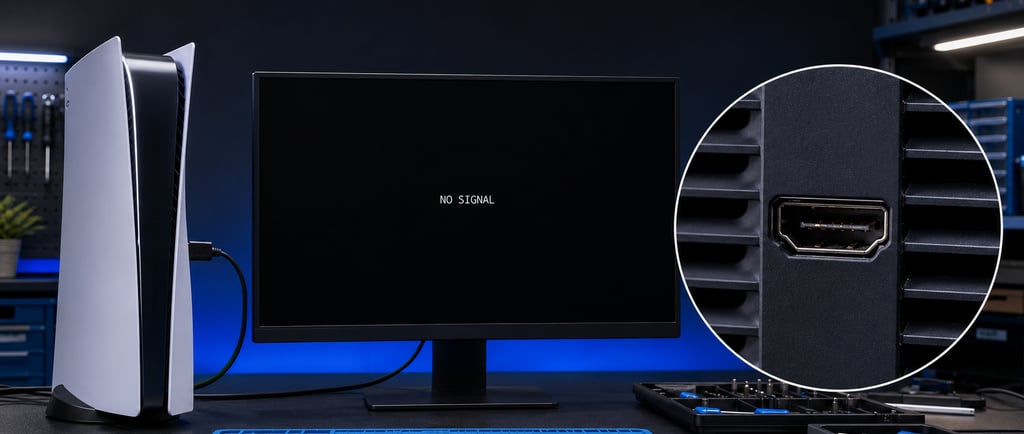
Your PS5 turns on, the light starts blue and then changes to a steady white, but the TV remains black or displays “No Signal.” This is a common PS5 display problem, and the light pattern gives us an important clue. When the light changes from blue to steady white, the console has normally completed its startup process. If there is still no picture, the problem is usually within the HDMI connection or HDMI signal path rather than a complete power failure.
A damaged HDMI port is one of the most common causes. However, the console should be properly tested before replacing the port because a defective cable, TV input or HDMI controller can produce similar symptoms.
What Does a Steady White Light on a PS5 Mean?
The blue light appears while the PS5 is starting. Once startup is complete, the indicator normally changes to a steady white light. This generally means the console is powered on and running.If the PS5 reaches the steady white light but the screen remains black, the console may be operating internally without successfully sending a video signal to the TV or monitor.
This is different from a PS5 that immediately turns off, remains stuck on a pulsing blue light or shows no power at all. When the console reaches a steady white light but produces no picture, the HDMI connection and output circuit are the first areas that should be inspected.
Does a Black Screen Always Mean the HDMI Port Is Broken?
A damaged PS5 HDMI port is a common cause, but it is not the only possibility.The same symptoms can be caused by:
A defective HDMI cable
The wrong HDMI input selected on the TV
A faulty HDMI input on the TV or monitor
An HDMI handshake or resolution problem
Bent or damaged pins inside the PS5 HDMI port
Broken solder joints underneath the HDMI port
A damaged HDMI controller or another motherboard component
Obvious physical damage may be visible by looking inside the port. Other problems may only be detected through inspection under magnification and electrical testing.
What Should You Check First?
Before assuming that your PS5 needs an HDMI port replacement, try these basic checks:
Turn off the PS5 and TV completely, then reconnect both devices.
Confirm that the TV is set to the correct HDMI input.
Test the PS5 with another known-working HDMI cable.
Try a different HDMI input on the same TV.
If possible, test the PS5 on another TV or monitor.
Connect the PS5 directly to the display without using a soundbar, receiver, splitter or capture device.
These checks follow the general troubleshooting process recommended by PlayStation Support. If the PS5 still changes from blue to steady white without producing an image, the console should be professionally inspected.
Avoid repeatedly bending or wiggling the HDMI cable to make the picture return. If the port is already loose, this can worsen the damage and may separate solder pads or circuit-board traces from the motherboard.
Signs Your PS5 HDMI Port Needs to Be Replaced
An HDMI port replacement is more likely when:
The port looks bent, cracked or pushed inward
Pins inside the port are bent or missing
The HDMI cable feels unusually loose
The picture cuts in and out when the cable moves
The PS5 was dropped while the HDMI cable was connected
Another HDMI cable and display have already been tested
The TV recognizes other devices but does not recognize the PS5
If physical damage is confirmed, the damaged HDMI connector must be removed and a replacement port installed using professional board-level soldering equipment. The surrounding pads, traces and HDMI components should also be inspected before the console is reassembled and tested.
What If the HDMI Port Looks Normal?
An HDMI port can look normal from the outside while still having damaged internal pins or broken solder joints underneath it. However, a normal-looking port can also mean that the fault is farther along the HDMI circuit. The HDMI controller and nearby motherboard components are responsible for processing and transmitting the video signal. Damage in this area can cause the same steady-white-light and black-screen symptoms as a broken HDMI port. This is why proper diagnosis matters. Replacing a working HDMI port will not solve a failed HDMI controller or another motherboard-level problem.
PS5 HDMI Port Replacement in Vancouver
Computer 101 provides professional PS5 HDMI port replacement in Vancouver. We inspect the HDMI port and surrounding components, determine what has failed and provide a quote before proceeding with the repair.
Our PS5 HDMI service includes:
Inspection of the HDMI port and surrounding motherboard area
Confirmation that the cable or display is not causing the problem
HDMI port replacement when physical damage is confirmed
Board-level HDMI diagnosis when the port is not the only fault
Testing for stable video and audio output after the repair
A 90-day warranty on qualifying repairs
Computer 101 is located in Vancouver and serves customers from Vancouver, Burnaby, Richmond and other parts of Metro Vancouver. Walk-ins are welcome during business hours. You can also contact us before arriving to confirm availability or reserve an appointment.
Get Your PS5 Display Working Again
If your PS5 starts with a blue light, changes to steady white and still shows a black screen or “No Signal,” the HDMI system should be inspected. The HDMI port may need to be replaced, especially if it is loose or physically damaged. Proper diagnosis ensures that the actual fault is repaired instead of replacing parts unnecessarily.
Contact Computer 101 for professional PS5 HDMI repair in Vancouver.
📞 Phone: (604) 901-9799
✉️ Email: info@computer101.ca
📍 Address: 5853 Tisdall Street, Vancouver, BC
Frequently Asked Questions
Why does my PS5 show a white light but no picture?
A steady white light generally means the PS5 has powered on. A defective cable, incorrect display setting, damaged HDMI port or internal HDMI-circuit problem may be preventing the video signal from reaching the screen.
Can changing the HDMI cable fix a PS5 black screen?
Yes, if the cable is defective. Test a known-working HDMI cable and a different TV input before assuming that the PS5 requires repair.
Can a damaged PS5 HDMI port be replaced?
Yes. A physically damaged connector can usually be removed and replaced. The motherboard pads, traces and HDMI controller should also be inspected for additional damage.
How can I tell whether the HDMI port or controller is faulty?
Physical damage may be visible inside the port, but inspection under magnification and electrical testing may be necessary. Both faults can cause similar black-screen symptoms, so professional diagnosis is recommended.
https://computer101.ca/ps5-hdmi-replacement-vancouver-xbox-hdmi-replacement-delta-richmond-burnaby-downtown-gaming-console-hdmi-replacement


Your trusted partner for computer repair and IT solutions in Vancouver, Burnaby, Richmond, Surrey, Langley, West Vancouver, and Coquitlam.
Contact Information
Business Hours
Monday - Saturday 10:00 AM -7:00 PM
Sundays Closed


